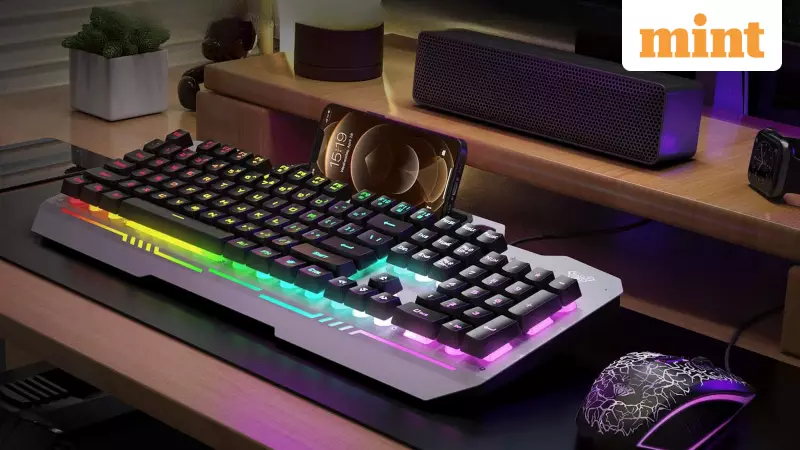
RGB keyboards have transformed gaming setups across India, bringing vibrant colours and personal flair to desktop environments. These illuminated peripherals allow gamers to express their unique style through animated patterns, gradient transitions, and custom lighting profiles. While they significantly enhance visual appeal, these colourful displays also impact how players experience extended gaming sessions, particularly affecting concentration and visual comfort.
The Science Behind RGB Lighting and Visual Distraction
The human eye naturally responds to light, brightness variations, and movement within its field of vision. Even when focused intently on the screen, the keyboard occupies the lower portion of your visual field, meaning your eyes constantly detect activity happening there. During marathon gaming sessions, animated RGB effects send continuous signals that your brain must actively filter out. This makes maintaining concentration slightly more challenging, especially in games requiring quick reflexes and split-second decisions.
Many Indian gamers enjoy experimenting with dramatic lighting modes, but over time, these dynamic elements can contribute significantly to mental fatigue. A keyboard that constantly shifts colours becomes an active visual object rather than remaining a subtle, functional tool. This visual distraction can slow reaction times by crucial fractions of a second - a critical factor in fast-paced competitive games where every millisecond counts.

Movement Effects, Colour Intensity and Their Impact on Eye Comfort
Lighting movement stands out as the most noticeable factor affecting gaming focus. Patterns like rainbow waves, rapid strobing, and pulsing animations create visible motion that draws attention unintentionally. Since peripheral vision remains highly sensitive to movement, these patterns pull your focus away from the screen action. This impact magnifies during long gaming hours, creating a mild but persistent sense of distraction that accumulates over time.
Reactive lighting effects, where keys illuminate upon pressing, provide enjoyable feedback for casual gaming or showcasing new setups. However, they generate constant flicker during active gameplay. This flickering competes directly with on-screen action, adding unnecessary complexity to your visual environment. During extended sessions, this can create feelings of overstimulation and visual overload.
Colour intensity plays an equally important role in visual comfort. Bright neon shades produce stronger visual stimulation that demands more effort from your eyes, particularly in dimly lit rooms common among Indian gamers. Softer, muted tones create a much calmer atmosphere that supports extended gameplay. Long gaming sessions benefit tremendously from gentle lighting because your eyes don't need to constantly adapt to intense, demanding colours.
Brightness settings prove crucial for maintaining visual balance. Most keyboards default to high brightness levels, creating strong contrast with your screen. When key lighting becomes too powerful, your eyes continuously adjust between these two light sources. Reducing brightness helps maintain visual equilibrium, and many competitive players discover that lower brightness settings feel more comfortable once they adapt to them.
Optimising Your Gaming Environment with Balanced RGB Settings
Thoughtful lighting choices make noticeable differences during marathon gaming sessions. When your keyboard maintains visual stability, your mind stays focused, reaction times feel sharper, and fatigue sets in much later. Calm lighting also supports long-term gaming habits by reducing unnecessary eye strain that can affect your performance over time.
The most effective approach involves creating multiple lighting profiles tailored to different gaming scenarios. A soft static colour works ideally for extended competitive play because it keeps your visual field calm and stable. Slow breathing effects suit relaxed or story-driven gameplay, adding gentle ambience without distracting movement. Reserve bright, animated patterns for display moments or mood-setting situations where aesthetics matter more than pure focus.

Key highlighting represents another effective strategy for Indian gamers. Instead of illuminating the entire keyboard, players can light only essential keys. This creates a clean focus area that supports muscle memory while minimizing distractions. Modern keyboards often support layered lighting, allowing gamers to isolate movement keys, ability keys, and frequently used shortcuts.
Room lighting should complement your keyboard illumination. Playing in completely dark rooms amplifies brightness contrast between your monitor and keyboard. Adding gentle background lighting helps balance your visual space, making RGB effects feel less intrusive and more comfortable for extended use.
The goal isn't eliminating RGB animations entirely but creating setups that remain comfortable, stable, and visually balanced during long sessions. Controlled lighting helps maintain focus, supports better gameplay, and reduces strain. This approach ensures your keyboard remains a helpful gaming asset rather than an unintentional distraction that compromises your performance.