

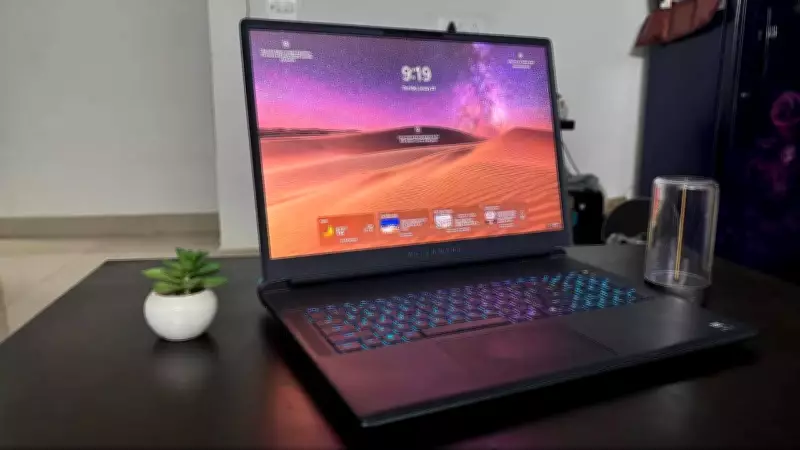
Dell Alienware 18 Area-51: A Comprehensive Review of the Ultimate Gaming Laptop
Dell's Alienware Area-51 series has long been synonymous with uncompromising performance in the gaming laptop arena. The latest Alienware 18 Area-51 continues this legacy, targeting users who demand no-nonsense gaming and creative prowess. With a weight of approximately 5kg including the charger, this machine is not designed for ultraportability but rather for raw power. Priced at over Rs 5 lakh, it caters to enthusiasts and professionals seeking desktop-level capabilities in a portable form factor.
Design and Build Quality: A Statement of Power
The Alienware 18 Area-51 immediately stands out with its Liquid Teal finish, which subtly shifts under different lighting conditions, creating an otherworldly aesthetic. This unique colour, combined with the subtle Alien logo, ensures the laptop makes a bold statement. Dell has incorporated fluid design contours throughout the chassis, featuring V-Rail edges on the lid for easier one-handed opening. However, due to the weight, smoother operation often requires both hands.
The pillowed palm rest is a notable design highlight, with gentle curves that conform to the natural resting position of wrists. During extended typing and gaming sessions, this design significantly reduces wrist fatigue compared to flat palm rests. For instance, while playing EA Sports FC 26 in Manager mode, users reported no palm discomfort even after four consecutive matches.

Dell's Zero Hinge design creates a floating display effect, with a robust hinge mechanism that shows no flex or wobble. The hinge enables an adaptive rear design with translucent materials that showcase AlienFX lighting. However, the laptop's surfaces, including the lid and keyboard area, are prone to dust and fingerprints.
Weighing 4.34 kg, the Alienware 18 is manageable for short moves but challenging for frequent transport like stairs or airports. The 18-inch display features sleek bezels on three sides, with a thicker bottom bezel housing the Alienware branding, a common design in gaming laptops prioritising camera quality.
Keyboard and Trackpad: Precision and Customisation
The laptop is equipped with a Cherry MX Ultra Low Profile mechanical keyboard, offering satisfying tactile feedback and audible clicks without being overly loud. Each key features individual AlienFX RGB lighting, customisable through shortcuts. The full-sized layout includes a dedicated number pad, useful for spreadsheet work and gaming shortcuts.
One minor drawback is the power button's integration within the keyboard area, which led to accidental presses during intense gaming sessions. The trackpad includes RGB LED AlienFX lighting that synchronises with the keyboard, offering comprehensive customisation options. Its glass surface is smooth and responsive, supporting multi-touch gestures reliably, though a dedicated gaming mouse is still preferred for shooting games.
Windows Hello integration via the fingerprint sensor works reliably, unlocking the system within a second.
Display and Camera: Immersive Visuals
The 18-inch WQXGA display boasts a 300Hz refresh rate, 500 nits brightness, and 100% DCI-P3 colour coverage. In demanding games like Cyberpunk 2077 and Red Dead Redemption 2, colours appear vibrant and accurate. The high refresh rate is particularly beneficial in fast-paced shooters like Valorant, providing fluid motion and improved target tracking.
G-SYNC support eliminates screen tearing, while Advanced Optimus technology automatically switches between integrated and discrete GPUs based on workload. ComfortView Plus reduces blue light emissions without compromising colour accuracy, reducing eye strain during late-night sessions. The 8MP UHD HDR camera delivers precise video calls with effective noise reduction, and the IR sensor for facial recognition works flawlessly even in varying lighting conditions.
Performance and Software: Unleashing Power
Powered by an Intel Core Ultra 9 processor with 24 cores and 64GB of DDR5 RAM, the system handles heavy multitasking seamlessly. The Nvidia GeForce RTX 5090 GPU with 24GB GDDR7 memory delivers desktop-class performance, achieving up to 175W Total Graphics Power within a 280W Total Performance Power ceiling.

In tests, Cyberpunk 2077 maintained frame rates above 100 fps with ray tracing enabled, while creative tasks like 4K video editing in Adobe Premiere Pro were handled efficiently. The 2TB Gen5 PCIe NVMe SSD ensures quick load times, with file transfers reaching speeds above 7000 MB/s.
Dell's new Cryo-Chamber cooling system, featuring quad fans and enhanced copper components, maintains thermal stability without excessive noise. CPU temperatures stayed between 75-85°C during intensive gaming, with the keyboard surface remaining comfortable to touch.
Audio, Connectivity, and Battery Life
The audio system includes separate woofers and tweeters with Dolby Atmos support, providing clear directional cues in games. However, for serious audio work, external speakers are recommended. Connectivity options are robust, with Thunderbolt 5 ports, HDMI 2.1, and Wi-Fi 7, though the absence of a 3.5mm audio jack and SD card reader is noted.
Battery life is limited, with nearly 5 hours on light productivity and around 90 minutes for gaming. The 96WHr battery supports Alienware Battery Defender technology to prolong lifespan, but the laptop functions best when plugged in.
Verdict: Is It Worth the Investment?
Priced at Rs 5,19,450, the Dell Alienware 18 Area-51 excels as a desktop-replacement powerhouse for gaming and creative professionals. Its strengths include exceptional performance, advanced cooling, and a high-refresh display. However, the weight and limited battery life are significant trade-offs. For users prioritising performance over portability and willing to pay a premium, this laptop delivers unparalleled capabilities.





