Logitech MX Master 4 Review: Elevating Workspace Peripherals to New Heights
The evolution of workspace peripherals has been remarkable, transitioning from bulky, uncomfortable keyboards and mice to sophisticated tools designed for efficiency and intuitive human-computer interaction. Logitech has consistently led this charge, making computer accessories not only functional but enjoyable. Their latest flagship, the MX Master 4 productivity mouse, launched in India in December at a price of ₹15,995, aims to push these boundaries even further. Targeting professionals who demand precision and extensive customization, this premium pointing device builds upon the foundation of its predecessors. After weeks of rigorous testing, we explore whether it offers mere incremental improvements or a truly transformative experience.
Design and Build Quality: Refined Ergonomics and Durability
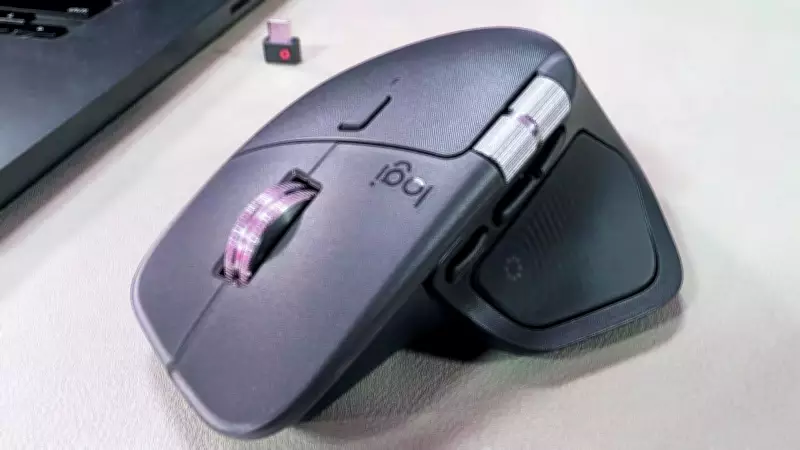
The overall design of the MX Master 4 retains the familiar silhouette of earlier models, with subtle refinements that emphasize evolution over revolution. Logitech has strategically reduced the rubberized texture coverage in favor of tactile grip surfaces, enhancing the natural feel of the hand positioning. Slightly larger than the MX Master 3S, this adjustment translates to reduced fatigue, a better grip, and superior ergonomic support during prolonged usage sessions.
Construction quality remains exceptional, featuring aerospace-grade aluminum scroll wheels and precisely calibrated button mechanisms that ensure substantial durability without unnecessary bulk. The buttons are clicky and tactile, yet significantly quieter—Logitech claims the MX Master 4 is 90% quieter than its predecessor. The device supports USB Type-C Quick Charging, with a one-minute charge providing up to 3 hours of use, while a full charge lasts an impressive 70 days.

It is equipped with an 8,000 DPI optical sensor for fluid and accurate performance across various surfaces, including slightly rough tables, ensuring consistent cursor control. Available in Graphite and Pale Grey color options, our review unit featured the Graphite variant, with patterns on the thumb and silver scroll wheels adding a touch of elegance to the design.
Connectivity and Performance: Seamless Multi-Device Integration
Wireless connectivity is a critical factor for productivity peripherals, and the MX Master 4 excels with its low latency and ease of use. It supports dual connection methods: a bundled USB-C Logitech Bolt receiver or direct Bluetooth pairing, allowing simultaneous connections with up to three devices. This feature is particularly beneficial for complex multi-monitor workstations, enabling seamless transitions without the need to switch mice.
The mouse boasts dual aluminum scroll wheels: a primary top-mounted wheel and a supplementary lateral wheel. The main scrolling mechanism offers both precision mode and free-flowing free-scrolling mode, switchable via a dedicated toggle button. The lateral wheel facilitates horizontal navigation in wide documents, such as spreadsheets in Google Sheets, enhancing productivity in data-intensive tasks.
Haptic Feedback: A Leap in Tactile Intelligence
Perhaps the most significant innovation in the MX Master 4 is its comprehensive haptic feedback integration. Vibration motors embedded within the chassis provide physical responses across various interactions, from basic scrolling and selection to specialized application functions. With four intensity graduations—subtle, low, medium, and high—users can customize feedback to their preferences. Medium intensity delivers pronounced yet unobtrusive feedback, boosting interaction confidence without becoming distracting.
The system intelligently modulates vibration patterns based on context, offering gentle pulses during standard navigation and more emphatic responses during critical selections or boundary encounters. This tactile communication is especially valuable for precision tasks like video timeline scrubbing or CAD model manipulation, where visual focus is entirely on screen content. Haptic confirmation of selection points or increment adjustments reduces cognitive load and accelerates workflow efficiency.

While power consumption increases with vibration intensity, Logitech provides battery-saving profiles and the option to disable haptics entirely via the Logi Options+ software. A minor inconvenience is the inability to toggle these settings directly from the device, requiring software intervention for adjustments.
In summary, the Logitech MX Master 4 represents a sophisticated advancement in workspace peripherals, blending refined design, robust performance, and innovative haptic feedback to meet the demands of modern professionals.