Google has officially announced the expansion of its innovative prompt-based photo editing feature within Google Photos to users in India, Australia, and Japan. This rollout marks a significant step in making one of Google's most sophisticated AI-powered tools accessible to a broader global audience, following its initial introduction in the United States.
Revolutionizing Photo Editing with AI
The feature fundamentally transforms how users edit their photos by allowing them to make complex adjustments simply by typing or speaking natural language prompts. This conversational editing experience eliminates the need for manual sliders and intricate tools, making photo enhancement faster, more intuitive, and accessible to everyone, regardless of their technical expertise.
How to Use the New Feature
To utilize this advanced capability, users need to open an image in the Google Photos editor, tap on the "Help me edit" option, and then instruct the AI by either typing or verbally stating what changes they desire. Google emphasizes that this is just one of the many creative ways users can now interact with their digital memories.

Creative Possibilities with Prompt Editing
Google has illustrated the power of this feature by sharing ten compelling examples of how prompts can be used to achieve remarkable edits:
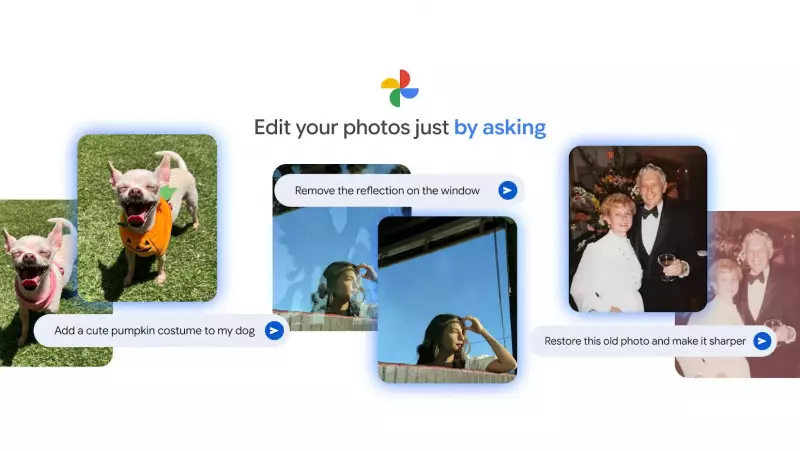
- Remove Unwanted Elements: Easily eliminate distractions like window reflections or background noise to achieve a perfectly clear photo.
- Erase and Sharpen: Instantly remove unwanted objects such as fences or old timestamps while simultaneously sharpening the image for enhanced clarity.
- Enhance Lighting: Improve selfies by adding studio-quality lighting to create a more polished and professional look.
- Expand Composition: If a photo feels too tightly framed, simply ask Photos to expand the composition for a better final image.
- Visualize Interior Changes: Envision new room decor by prompting Photos to add furniture, lighting, or other elements to preview potential updates.
- Add Fun Elements: Transform ordinary scenes into extraordinary ones, such as turning a grassy hill into a vibrant field of sunflowers.
- Dress Up Pets: Easily get festive pictures of pets by asking Photos to add costumes, like creating a pumpkin-themed dog for holiday celebrations.
- Restore Old Photos: Give faded cherished memories from years or decades ago new life with a simple prompt to restore their original vibrancy.
- Multiple Edits in One Go: Instead of adjusting multiple sliders, consolidate all desired changes into a single prompt and let Photos handle the complex editing work.
- Create Fantastical Scenes: Unleash creativity by making out-of-this-world edits, such as placing a skiing dog on the moon with a spaceship and Earth in the background, all without requiring advanced skills.
This expansion underscores Google's commitment to leveraging artificial intelligence to simplify and enhance everyday digital experiences, particularly in the realm of personal photography and creative expression.