AI-Powered Nostalgia: Tokyo Drift Scene Gets Hilarious Makeover Across Social Media
While the emotional ballad 'See You Again' once defined a generation's connection to the Fast and Furious franchise, a fresh and innovative social media phenomenon is now sparking waves of nostalgia with a distinctly artificial intelligence twist. This viral trend is captivating users on major platforms including TikTok, Instagram, and X, focusing specifically on a legendary moment from The Fast and the Furious: Tokyo Drift.
The Iconic Scene Reimagined with AI Creativity
The trend centers on the memorable scene where the character Han leans casually against his sleek orange Mazda RX-7. However, creators are injecting hilarious and unexpected elements by using AI tools to swap out the sports car for a wide array of absurd alternatives. From the classic Mini Cooper driven by Mr. Bean to miniature toy cars and completely random objects, the creativity knows no bounds. Some participants take the concept even further by replacing Han himself with famous personalities from pop culture and politics.
Notable edits feature Indian Prime Minister Narendra Modi, former US President Donald Trump, and even beloved cartoon characters like SpongeBob SquarePants assuming Han's iconic pose. This blend of automotive nostalgia and contemporary AI humor has captured the imagination of millions, turning a simple movie moment into a canvas for digital artistry and comedic expression.

Viral Examples Showcasing Diverse Interpretations
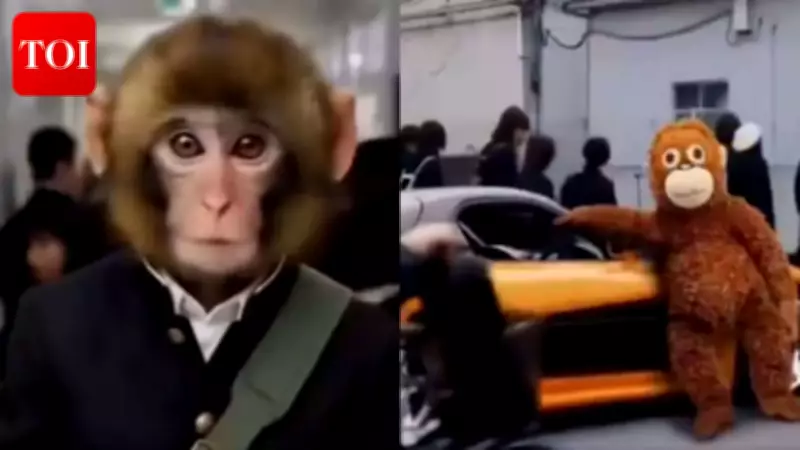
Social media feeds are overflowing with inventive and humorous takes on this trend. One particularly viral edit on X replaced the character Sean with the internet-famous Japanese monkey Punch, while Han was substituted with his stuffed toy companion Ora-mama. In this touching rendition, Punch exits a school building to greet the toy, culminating in a heartfelt hug between the two.
Another creative interpretation inserted Jon Snow from the acclaimed HBO series Game of Thrones as Sean, with Emilia Clarke's Daenerys Targaryen standing beside her dragon in place of Han. A particularly amusing version featured the cartoon character Oggy from Oggy and the Cockroaches as Sean, with his brother Jack waiting patiently by a motorcycle. As more users experiment with the trend, social media platforms are becoming saturated with these clever and often hilarious AI-generated images, each adding a unique spin to the original cinematic moment.
Step-by-Step Guide to Joining the Tokyo Drift AI Trend
For enthusiasts eager to participate in this viral movement, the process is straightforward, though attention to detail is crucial for achieving the desired effect on the first attempt. Follow these clear steps to create your own AI-powered Tokyo Drift masterpiece:

- Begin by downloading and installing the specialized application known as Kling AI onto your mobile device or computer.
- Create a new account within the app and ensure you are fully focused, as the recreation process typically allows only one chance to get it right.
- Navigate to the "explore" section located in the bottom navigation bar of the application interface.
- Type the exact phrase "Fast and the Furious: Tokyo Drift" into the search bar to locate the specific template designed for this trend.
- Once you find the template, click on the "recreate" button to initiate the editing process.
- Delete the second photo provided in the template and upload your own custom image that you wish to insert into the scene.
- Adjust the color settings and other visual parameters to match your creative vision and personal aesthetic preferences.
- Finally, download the completed image and share it across your preferred social media platforms to contribute to the growing collection of viral edits.
Alternative Method Using AI Chatbots for Static Images
For those interested in creating a static picture version of the trend rather than a video, utilizing advanced AI chatbots like ChatGPT or Google's Gemini is an excellent alternative approach. Start by searching online for a high-quality screenshot of Han leaning against his iconic Mazda RX-7 from Tokyo Drift. Upload this reference image to your chosen AI platform, then add the photo you intend to use as a replacement for the car. Craft a detailed and specific prompt instructing the chatbot to execute the swap seamlessly. With these simple steps, you can generate your own personalized Tokyo Drift moment to proudly share and obsess over within your digital circles.