For countless computer users across India, working with multiple monitor setups has become increasingly common. However, this productivity boost comes with an unexpected challenge: losing track of the mouse cursor across expansive digital workspaces. The problem becomes particularly pronounced when using more than two or three displays, where the tiny pointer can easily disappear amidst open applications and windows.
The Visibility Challenge and Microsoft's Solution
This cursor visibility issue affects diverse user groups, from professionals managing complex workflows to gamers requiring precise aiming. Individuals with visual impairments face even greater difficulties locating the pointer on their screens. Recognizing this widespread problem, Microsoft has integrated an elegant solution within its official PowerToys application suite.
Microsoft PowerToys represents a free, official collection of utilities designed specifically to enhance Windows functionality. Among its numerous productivity tools lies the Mouse Pointer Crosshair feature, which addresses the cursor visibility problem directly by placing a customizable crosshair overlay on your screen.

How to Enable the Crosshair Feature
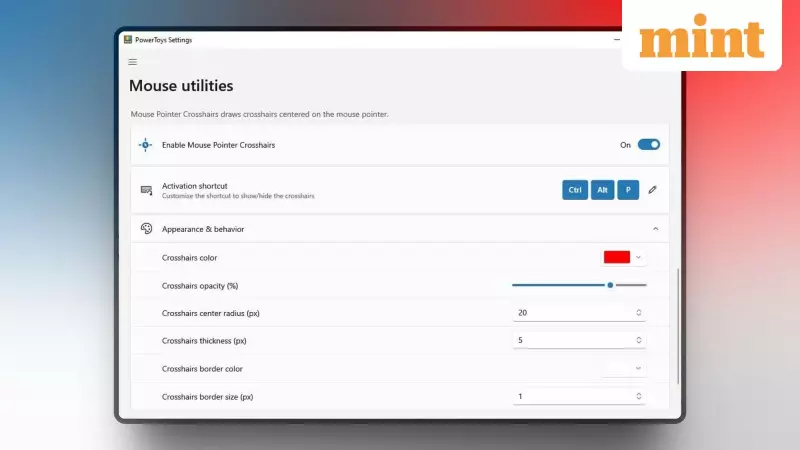
Implementing this visibility enhancement requires just a few simple steps. First, download and install PowerToys from either the Microsoft Store or its GitHub repository. Once installed, launch the application and navigate to the "Mouse Utilities" section in the sidebar.
Locate the "Mouse Pointer Crosshair" option and toggle it to activate the feature. The crosshair can be instantly enabled or disabled using the keyboard shortcut Ctrl+Alt+P. Microsoft provides extensive customization options, allowing users to adjust the crosshair's color, thickness, and border according to their visual preferences and screen conditions.
The crosshair remains persistently visible as you navigate your desktop, maintaining sharp focus on your pointer location regardless of how many monitors you're using or what applications are running.
Gaming Applications and Alternative Options
Beyond productivity scenarios, this feature offers significant benefits for gaming enthusiasts. Many first-person shooting games either lack crosshair customization options or provide limited visibility. The PowerToys crosshair can substantially improve aiming performance in such games, giving players a consistent visual reference point.
For those seeking alternative solutions, the open-source community offers CrossOver—a lightweight, free crosshair overlay application available on GitHub. This third-party option works seamlessly across any window or full-screen game. Being open-source ensures transparency and community-driven development, which many privacy-conscious users prefer.
However, for most Indian users seeking a reliable, official Microsoft solution without additional software dependencies, PowerToys remains the recommended approach. Its seamless Windows integration and corporate backing provide assurance of compatibility and security that third-party alternatives cannot always guarantee.