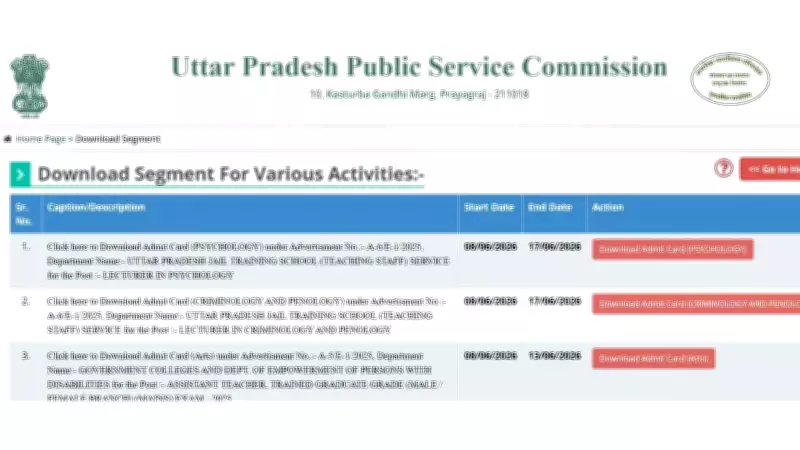
The Uttar Pradesh Public Service Commission (UPPSC) has activated the admit card download links for the LT Grade Assistant Teacher Mains and Lecturer recruitment examinations. Candidates who successfully appeared for the preliminary examination can now access their hall tickets through the official UPPSC website.
Admit Cards Released for Various Subjects
The admit cards have been released for the LT Grade Assistant Teacher (Mains) examinations in Arts, Urdu, and Biology. Additionally, UPPSC has activated hall ticket download links for Lecturer posts in a wide range of subjects, including Psychology, Criminology and Penology, Sociology, Geography, Economics, Civics, Physics, Chemistry, Mathematics, English, History, Biology, Hindi, Urdu, and Sanskrit.
Important Instructions for Candidates
The commission has advised all candidates to download their admit cards well before the examination date and carefully verify all the details mentioned on them. Entry to the examination centre will be permitted only after the verification of the admit card and other required documents. Candidates are urged to carry a printed copy of the admit card along with a valid photo ID to the exam venue.

How to Download the UPPSC Admit Card
Candidates can follow the step-by-step procedure outlined below to download their admit cards:
- Visit the official UPPSC website.
- Click on the 'Candidate Corner' section.
- Select the 'Admit Card' option.
- Choose the relevant subject for which you are appearing.
- Enter your registration number and date of birth in the required fields.
- Submit the details to view your admit card.
- Download the admit card and verify all the information printed on it.
- Take a printout of the admit card and carry it to the examination centre on the day of the exam.
A direct link to download the admit cards is also available on the official website for quick access.